HarnessServer
HarnessServer runs in the Agent host environment, staging compiled Skills, SOPs, and Rules into Workspaces by role, and serving REST and MCP endpoints for runtime context on demand. In standalone deployment, REST and MCP (Streamable HTTP) run on the same HTTP port. It does not ingest enterprise knowledge directly; managerial memory is disabled by default and restricted to authorized Agents. It can operate standalone on local content or connect to LarkScout for upstream synchronization and search.


HarnessServer
Content Delivery for AgentsContext delivery and capability distribution component for Agent host environmentsStage Skills, SOPs, and context into Workspaces by role—preloaded or on-demand, configurable per Agent.
- Pre-Staged
- Main config and Skills ready in advance
- Role-Based
- coordinator / worker distribution
- REST + MCP
- Colocated on same port in standalone mode
Typical pains
- Each Workspace requires manual, error-prone configuration of prompts and tools
- Newly onboarded Agents waste cycles exploring the environment before becoming productive
- New Agent rollouts lack a standardized, repeatable onboarding pipeline
Core value
Track which agents run each skill
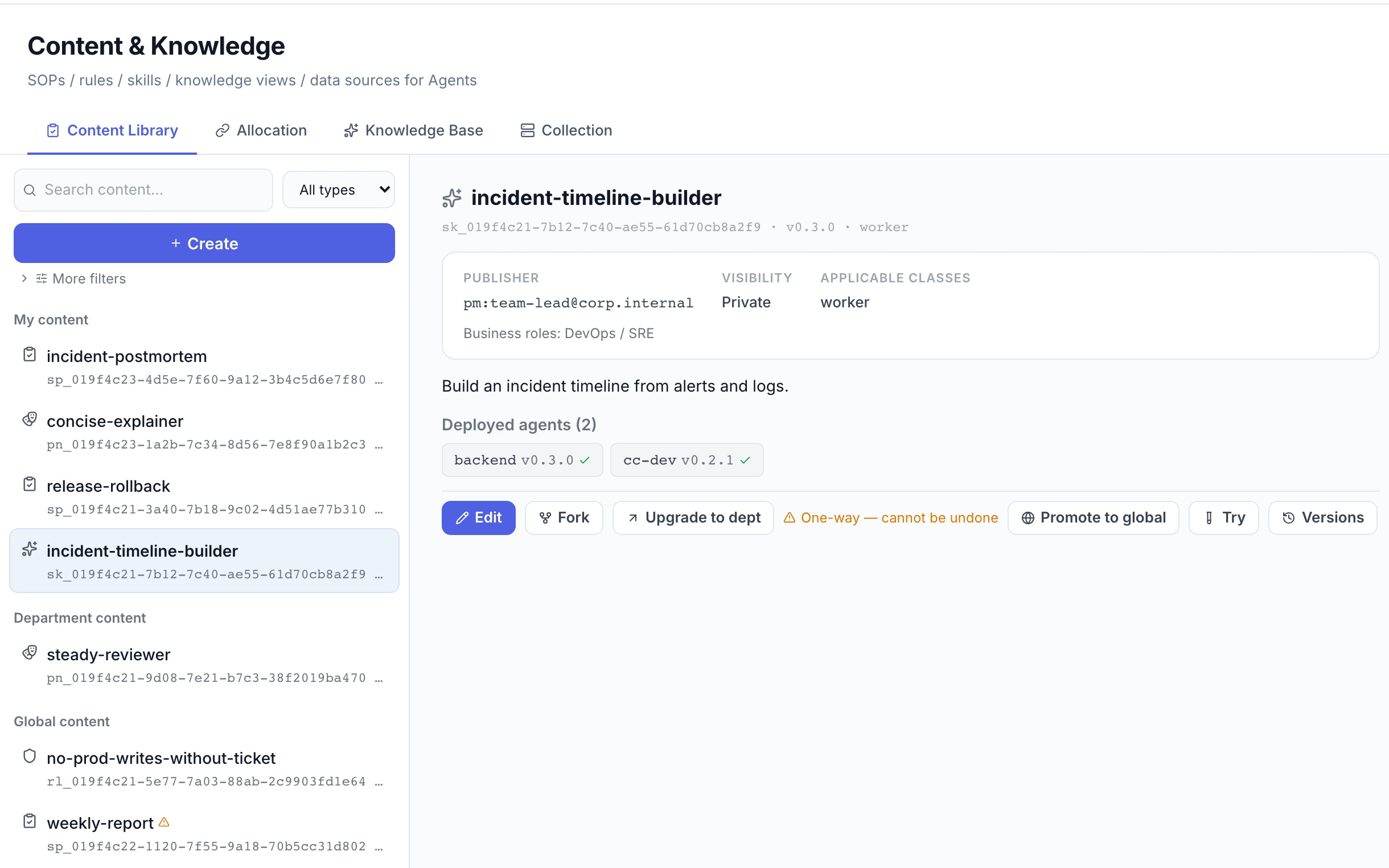
When managing multiple agents, teams struggle to identify which agent runs which capability. Once a skill is approved by operators, HarnessServer deploys it to matching agents; the content detail panel in AULO shows the deployed agents and the deployed version.
Block dangerous calls before skill deployment
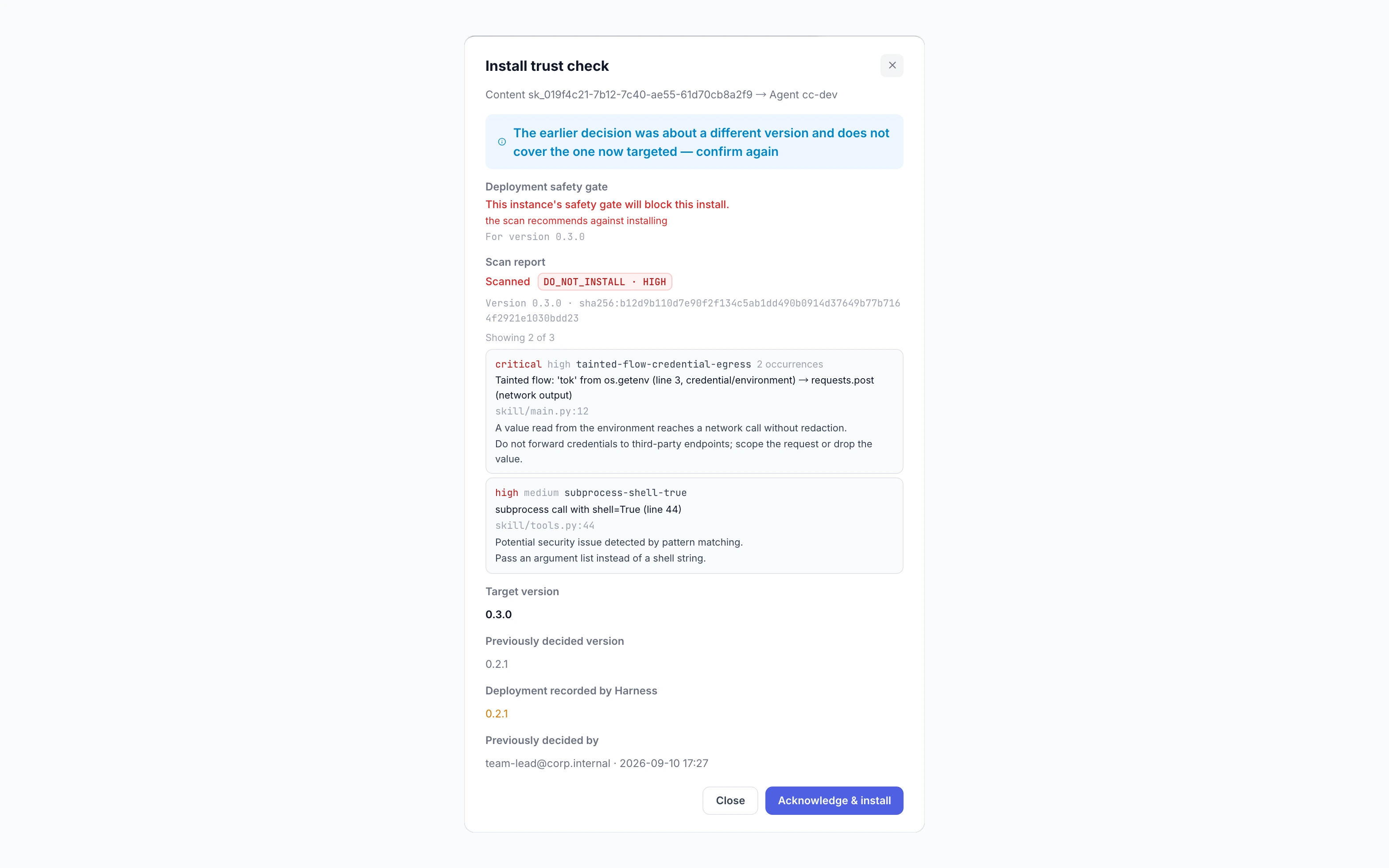
External or new skills may harbor dangerous calls and data exfiltration paths. Pre-deploy static scans trace dangerous patterns and taint flows to source lines, letting safety gates block installs. SkillScan is enabled by default for new installs, can be turned off, and is inactive when off.
Control what enters each agent's context
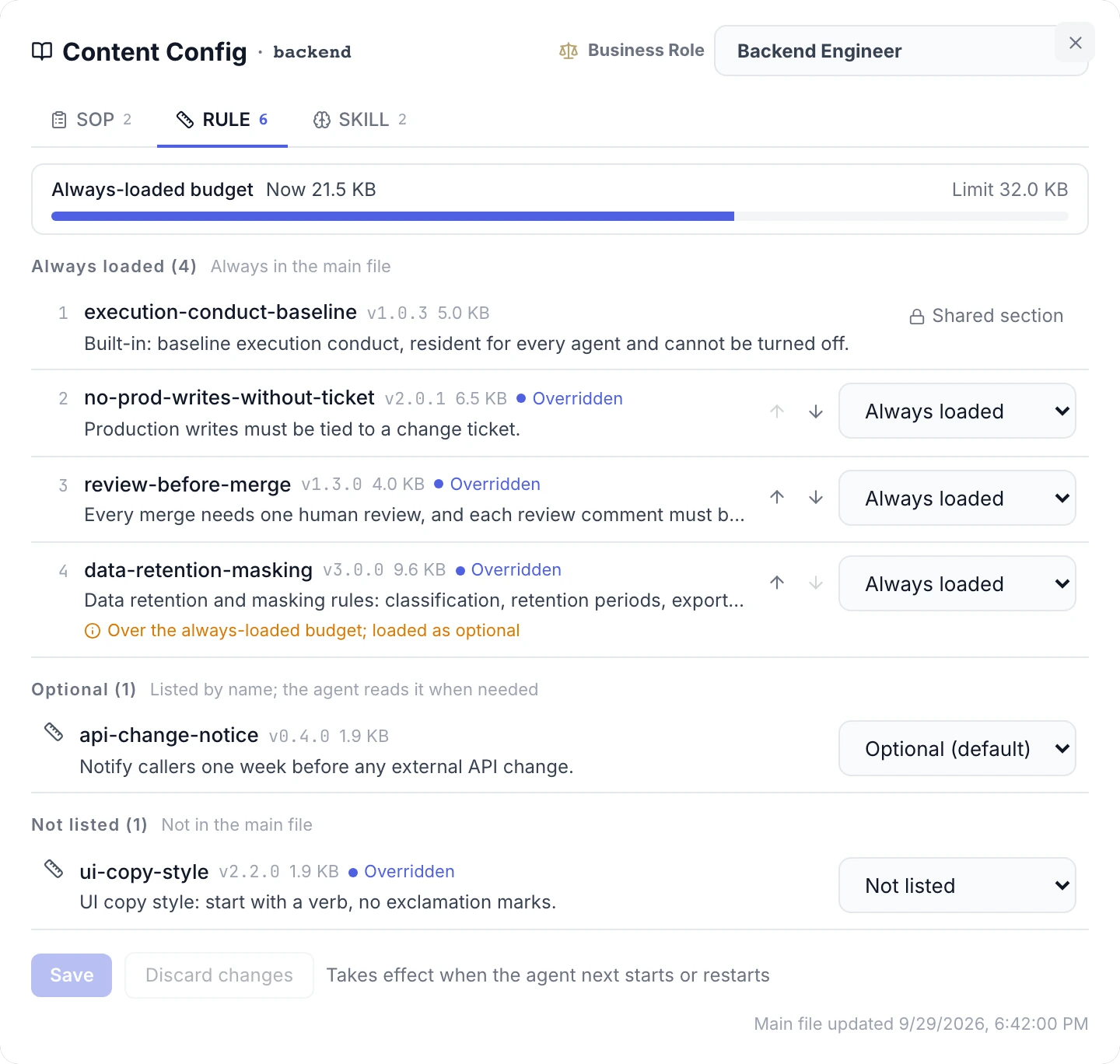
Always loading every rule exhausts an agent's context budget, while leaving them out risks missing guidance. Rules can be set per agent as always loaded, optional, or left out of the catalog (still fetchable by name). Over-budget always-loaded rules take effect as optional and show a warning.
Capabilities
Context supply
Skill assembly & scanning
Deployment & integration
Provenance & evaluation
Does / does not
- Dual-side on-demand context injection: Workers pull task context indices; Coordinators fetch SOPs by name
- Role-based workspace pre-provisioning: approved Skills deploy automatically (including upgrades); SOP / Rule sync by permission
- SkillScan pre-deploy static analysis: enabled by default for new installs and configurable to disable, providing Python AST danger-pattern and dependency static scanning
- Context snapshot and Content Version provenance: audit events linked by Trace ID record the content visible to a task and its versions, for context-change audit
- Per-runtime context file generation: CLAUDE.md / AGENTS.md / NODAL.md; unknown runtimes are refused
- Standalone and LarkScout integration: REST + MCP on its own, or connected to the LarkScout knowledge base
- Per-Agent content assembly: Rules can be always loaded, optional, or left out of the catalog (still fetchable by name), and SOPs optional or left out; expected vs. actual tiers can be checked
- Does not ingest raw documents or compile knowledge (upstream Claim compilation is LarkScout)
- Does not provide a shared memory pool for all Agents (managerial memory is off by default; when enabled it is served only to Agents granted memory_access in the registry, mainly the Coordinator)
- Does not manage OS-level process sandboxes (container and syscall controls belong to NodalOS)
- Does not produce a platform-wide score or Agent ranking, and never writes evaluation conclusions or performance aggregates into Agent-visible files
By role
Standardizes Agent onboarding, shifting Workspaces from manual scripting to role-based pre-staging and on-demand retrieval
Managerial memory is disabled by default; when enabled, only Agents granted memory_access can use it
Bridges the final mile between knowledge compilation and execution, eliminating Agent onboarding guesswork